When I stumbled upon Img.Upscaler on AppSumo, I was skeptical at first. The concept of enhancing images with just a click using AI? It sounded too good to be true. I decided to try this tool myself, forked over the $69 for the lifetime deal, and waited to see if it could really make a difference in my projects.
Table of Contents
ToggleExploring the Core Features of Img.Upscaler
Have you ever struggled with low-resolution images? I know I have. That’s why I was thrilled to discover Img.Upscaler. This tool offers a lifetime access deal for just $69. Yes, you heard that right! A one-time payment for a lifetime of image enhancement. It’s a game changer.
Unmatched Upscaling Capabilities
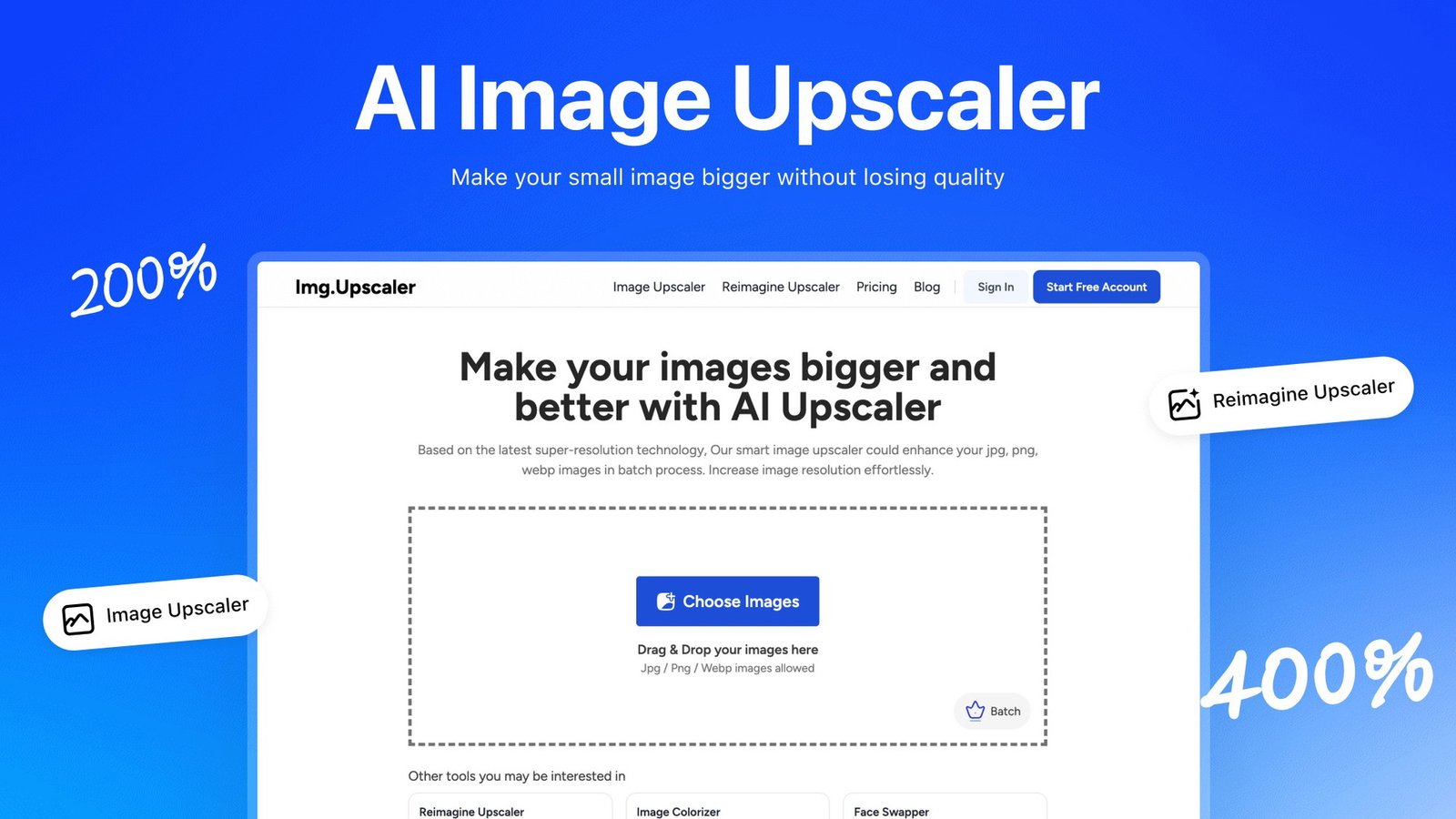
One of the standout features of Img.Upscaler is its ability to upscale images by 200% to 400% in mere seconds. Imagine transforming a blurry photo into a crisp, clear masterpiece in just a few clicks. It’s almost like magic!
For instance, if you have an old family photo that’s faded, Img.Upscaler can breathe new life into it. The clarity and detail are impressive. You won’t need to be a tech wizard to use it either. The user-friendly interface is designed for everyone, from beginners to seasoned professionals.
Batch Processing: A Time-Saver
Another feature that I found incredibly useful is the batch processing capability. You can process up to 8 images at once. This is perfect for anyone managing large collections of photos or product images. No more clicking through one image at a time!
- Upload multiple images with just one click.
- Download them all at once after processing.
- Save time and effort, especially for photographers and graphic designers.
It’s a straightforward process that makes your workflow smoother. I can’t tell you how much time I’ve saved using this feature.
Integrated Editing Tools
But wait, there’s more! Img.Upscaler also includes integrated editing tools. After upscaling, you can fine-tune your images. Want to crop or apply filters? You can do that right within the platform. It’s like having a mini photo editor at your fingertips.
Many users have shared their satisfaction with the quality of the upscaled images. One user said,
“Img.Upscaler has revolutionized the way I approach image processing. The quality is top-notch!”
This sentiment is echoed by many who appreciate the fast processing times and the ease of use.
Considerations and Limitations
<pWhile the features are impressive, it’s important to note a few limitations. Currently, Img.Upscaler outputs images at a maximum of 72 DPI. This might not be suitable for high-resolution printing needs. Also, the maximum file size for uploads is capped at 10MB. These limitations are worth considering, especially if you’re used to traditional software like Adobe Photoshop.
However, the deal comes with a 60-day money-back guarantee. This gives you ample time to test the service and see if it fits your needs. Plus, all future updates are included after purchase. It’s a risk-free opportunity to enhance your image processing capabilities.
Final Thoughts
In a world where visuals matter more than ever, Img.Upscaler stands out as a reliable tool for enhancing images quickly and affordably. With its lifetime access for just $69, it’s an investment that can pay off significantly for anyone in creative fields. Whether you’re a photographer, a graphic designer, or just someone who loves to enhance their personal photos, Img.Upscaler is worth considering.
So, if you’re grappling with low-resolution images, this tool may indeed be the assistant you need to elevate your visual projects seamlessly.
User Opinions: What Are People Saying?
When diving into the world of Img.Upscaler, I found a treasure trove of user opinions. The feedback is overwhelmingly positive, with an average rating of 4.1 from 27 reviews. That’s quite impressive, right? It suggests that many users are satisfied with the service.
Positive Sentiment and Fast Processing
One of the standout features that users rave about is the fast processing time. Many have commented on how quickly they can upscale their images. Imagine being able to enhance your photos in just a few seconds! This speed is a game-changer for graphic designers and photographers who often juggle multiple projects. As one user put it,
“The processing time is impressive and the results are great!”
This sentiment echoes throughout the reviews.
Moreover, the overall user experience has been highlighted as a strong point. The interface is designed to be user-friendly, making it accessible even for those who aren’t tech-savvy. I appreciate tools that don’t require a steep learning curve. It’s refreshing to find a service that prioritizes ease of use.
Emerging Complaints
<pHowever, it’s not all sunshine and rainbows. Some users have raised concerns about ads that detracted from their experience. These ads can be annoying, right? They disrupt the flow of using the tool. But here’s the good news: recent updates have removed ads for users who upgrade to the lifetime plan. This change has significantly improved the user experience. It’s a relief to see that the developers are listening to feedback and making necessary adjustments.
Key Takeaways from User Reviews
- Positive overall sentiment: The average rating of 4.1 indicates satisfaction among users.
- Fast processing: Users appreciate the quick turnaround time for image enhancement.
- User experience: The interface is designed to be intuitive and easy to navigate.
- Ads as a drawback: Some complaints about ads affecting usability have been noted.
Despite the complaints, the positive feedback outweighs the negatives. Users seem to feel that the benefits of Img.Upscaler far surpass any minor inconveniences. This is a testament to the tool’s effectiveness and its potential to meet user needs.
Final Thoughts on User Feedback
<pIn summary, user reviews reflect a favorable opinion of Img.Upscaler. The tool is praised for its efficiency and user-friendly design. While some usability issues due to ads have been noted, the recent updates have addressed these concerns. It’s encouraging to see a product evolve based on user feedback.
For anyone looking to enhance their images, Img.Upscaler seems to be a solid choice. With a lifetime deal available for just $69, it’s hard to pass up such an opportunity. If you’re interested, you can check it out here.
Limitations and Considerations: What to Keep in Mind
When exploring the Img.Upscaler, it’s essential to understand its limitations. While this tool offers impressive features, there are some crucial aspects to consider before diving in.
Printing Resolution Constraints
First and foremost, Img.Upscaler does not support higher printing resolutions like 300 DPI. This is a significant limitation for anyone looking to produce high-quality prints. Imagine you’ve just upscaled a beautiful image, only to find out it’s not suitable for printing. Frustrating, right?
Instead, the output is capped at 72 DPI. For most digital uses, this is fine. But if you’re aiming for print, you might find yourself in a bind. It’s like preparing a gourmet meal only to serve it on a paper plate. You want your work to shine, but the tools might not allow it.
File Size Limitations
Another point to note is that the paid version has a maximum file size limit of 10MB. This can be a dealbreaker for users who often work with larger files. If you’re a graphic designer or photographer, you know that some images can easily exceed this size. It’s like trying to fit a square peg in a round hole.
- Does not support higher printing resolution (300 DPI)
- Output is capped at 72 DPI
- 10MB file size limit in the paid version
Comparison with Traditional Software
When comparing Img.Upscaler to traditional software options like Adobe Photoshop or Canva, questions arise. How does it stack up? While Img.Upscaler is user-friendly and efficient, it lacks some of the advanced features found in traditional software. This raises a valid concern for users who need more than just basic enhancements.
Many users have expressed this sentiment. One user stated,
“While it’s a great tool, I still need my traditional software for print quality images.”
This highlights a common feeling among creatives. They appreciate the speed and ease of use but still rely on traditional software for high-quality outputs.
What Should You Consider?
So, what does this all mean for potential users? If print quality is crucial for your work, you might need to weigh these limitations against the benefits of Img.Upscaler. It’s a fantastic tool for quick enhancements, but it may not be the best fit for every project.
Users seeking high-resolution prints may need additional software for certain tasks. This could involve using Img.Upscaler for initial enhancements and then transferring the images to another platform for final touches. It’s a two-step process that might seem cumbersome but could be necessary for achieving the desired quality.
In summary, while Img.Upscaler offers a compelling solution for image enhancement, it’s vital to keep these limitations in mind. Understanding what the tool can and cannot do will help you make an informed decision. If you’re looking for a quick and easy way to upscale images, it might be worth trying out. Just remember to consider your specific needs, especially if print quality is a priority.
A Deal Worth Considering: Pricing and Guarantee
When I first stumbled upon Img.Upscaler, I was intrigued. A lifetime deal for just $69? It sounded too good to be true. But after diving into the details, I realized this offer is worth considering, especially for anyone dealing with low-resolution images.
Risk-Free Testing with a 60-Day Money-Back Guarantee
One of the standout features of this deal is the 60-day money-back guarantee. This means you can test Img.Upscaler without any risk. If it doesn’t meet your expectations, you can simply get your money back. How many products offer that kind of assurance? It’s like having a safety net while you explore the capabilities of this tool.
Future Updates Included
Another great aspect is that all future updates are included after your purchase. This ensures that you’re not just buying a product; you’re investing in ongoing value. As technology evolves, so will Img.Upscaler. You won’t have to worry about paying extra for new features or improvements. It’s all part of the package.
A Massive Discount
Let’s talk about the price. Img.Upscaler is currently discounted at nearly 90% off the original price of $699. That’s a significant saving! For just $69, you’re getting a powerful tool that can upscale images by 200% to 400% with remarkable clarity. I mean, who wouldn’t want to save that much while enhancing their images?
Excellent Value for Image Enhancement
For anyone struggling with low-resolution images, Img.Upscaler presents an excellent value. The ability to process multiple images at once is a game-changer. You can upscale up to 8 images in one go, which is perfect for photographers or graphic designers managing large collections. It’s quick and hassle-free, allowing you to upload and download images with just a click.
Moreover, the integrated image editor lets you crop, apply filters, and fine-tune your images post-upscaling. This means you can achieve a polished final product without needing extensive technical skills. Isn’t that a relief?
“For the price, Img.Upscaler is a steal! I can’t believe I got it for just $69.” – Enthusiastic User Review
What Users Are Saying
The sentiment surrounding Img.Upscaler is largely positive. With an average rating of 4.1 from 27 reviews, users appreciate the fast processing times and user-friendly interface. However, some have mentioned ads that could detract from the experience. Thankfully, recent updates have removed ads for users who opt for the lifetime plan. This improvement is a welcome change!
Considerations Before Buying
While Img.Upscaler is impressive, it’s essential to note some limitations. Currently, it doesn’t support higher printing resolutions like 300 DPI. Instead, the output is capped at 72 DPI. Additionally, the maximum file size for uploads is limited to 10MB. These factors are worth considering, especially if you’re comparing it to traditional software like Adobe Photoshop or Canva.
Final Thoughts
Given the comparative pricing and updates, I genuinely believe that buyers can feel secure investing in Img.Upscaler. It offers a comprehensive and efficient solution for image enhancement through AI-powered technology. If you’re grappling with low-resolution images, this tool may indeed be the assistant you need to elevate your visual projects seamlessly. With a straightforward operation and a commitment to enhancing user experience, it seems like a worthwhile investment. If you’re interested, check out the offer here.
TL;DR: Img.Upscaler offers a lifetime deal for an efficient AI tool enhancing and upscaling images, suitable for professionals and hobbyists alike, with useful features and a user-friendly interface.