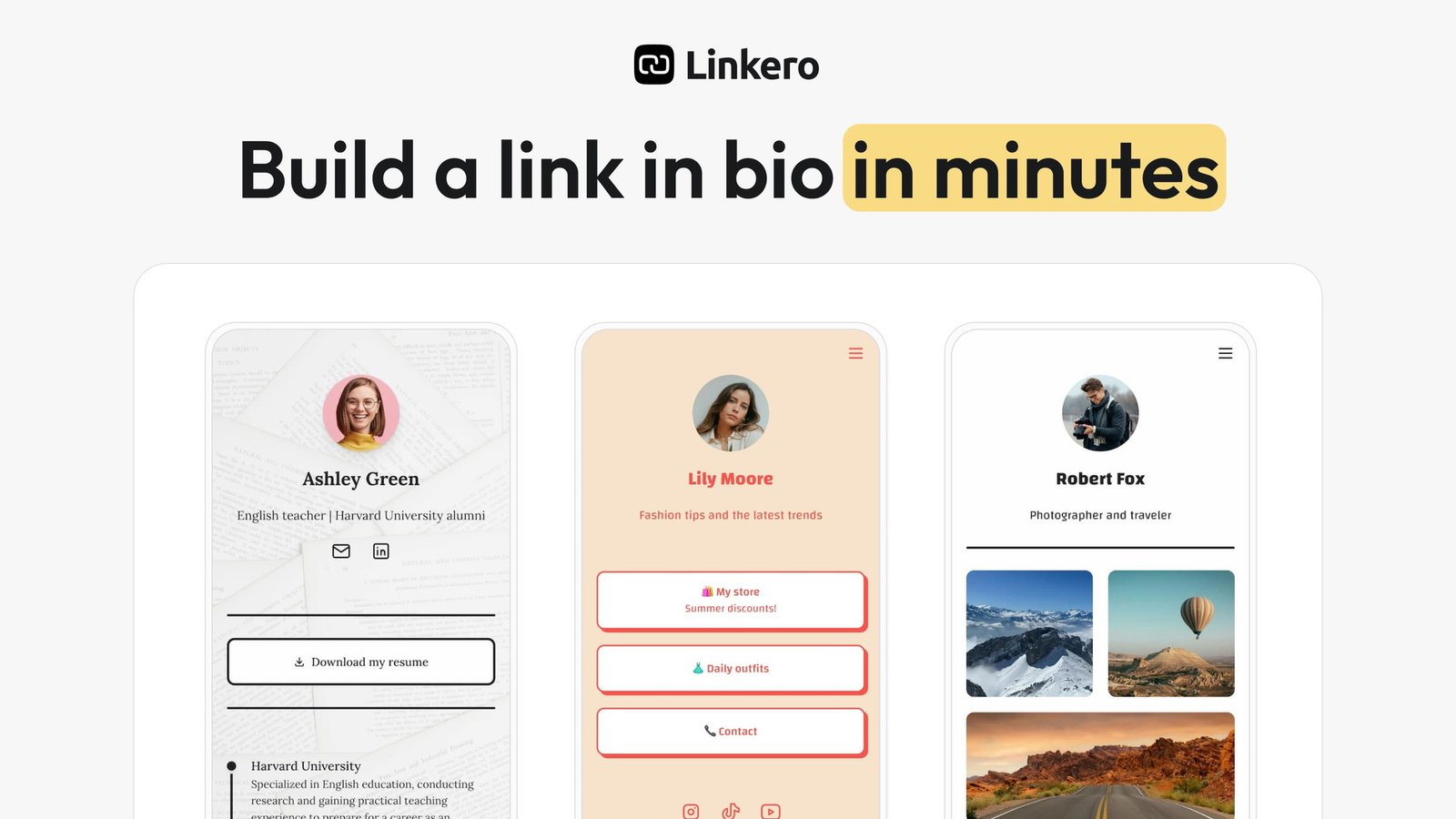
Have you ever felt overwhelmed juggling multiple links across different platforms? As a content creator, I certainly have! That’s why I was thrilled to discover Linkero, a tool that promises to simplify content management into a single, inviting space. Join me as I explore how Linkero can revolutionize your digital presence in just minutes, with customization options that truly speak to your brand identity.
Table of Contents
ToggleWhy Linkero Stands Out in a Crowded Market
When I first stumbled upon Linkero, I was intrigued. In a world where managing online content can feel overwhelming, this tool promises to simplify the process. It’s designed to help users create a personalized “link in bio” page, which is especially useful for content creators, freelancers, and influencers. But what makes Linkero truly stand out? Let’s dive into its key features.
1. Easy Setup Process
One of the first things I noticed about Linkero is its incredibly straightforward setup process. You can get started in just three simple steps:
- Add Content: Using an intuitive drag-and-drop editor, I can easily add links, videos, and social profiles. This feature allows for precise placement of each element on my page.
- Customize: Linkero offers a variety of themes, colors, and layouts. This means I can choose designs that reflect my personal brand. It’s like dressing up my digital presence!
- Analyze: With built-in analytics, I can track audience behavior. This includes link clicks, visitor stats, and even geographical locations. Understanding my audience is crucial for improving my content strategy.
Can you imagine setting up your online presence in just a few minutes? It’s a game-changer.
2. Customizable Themes and Layouts
Linkero shines when it comes to customization. The platform allows me to create a page that truly represents my brand. I can choose from various themes and layouts, ensuring my online persona is visually appealing. This level of personalization is vital for standing out in a crowded market.
Think about it: your online presence is often the first impression potential clients or followers have of you. Wouldn’t you want it to be memorable? With Linkero, I can make that happen.
3. Built-in Analytics
Another feature I find invaluable is the access to built-in analytics. It’s not just about creating a link in bio page; it’s about understanding how it performs. With Linkero, I can track:
- Link clicks
- Visitor statistics
- Traffic sources
- Geographical locations
- Devices used by visitors
This data is essential for anyone looking to refine their content strategy. After all, knowledge is power, right?
Linkero vs. Competitors
In a market filled with options like Bitly and Linktree, Linkero positions itself as a robust alternative. It caters to users who may not have technical skills. As Marcel Cruz, the founder, puts it,
“Linkero is designed to empower users without technical skills to easily manage their digital presence.”
This emphasis on user-friendly design is refreshing.
While other platforms may offer similar services, Linkero’s combination of ease of use, customization, and analytics sets it apart. It’s like having a personal assistant for your online presence.
Pricing and Customer Feedback
Now, let’s talk about the price. Linkero offers a lifetime deal for just $59, discounted from $120. This deal includes a 60-day money-back guarantee, which means I can try it out without any high initial risk. Plus, the customer rating is impressive, sitting at 4.9 out of 5 stars. That’s a testament to its effectiveness.
However, it’s important to note that the deal cannot be stacked, and I must redeem my code within 60 days to retain access to future Pro Plan updates. It’s a small caveat, but one worth keeping in mind.
Overall, my experience with Linkero has been positive. The features are designed for ease of use, and the analytics provide valuable insights. If you’re looking for a way to centralize your social media links and information efficiently, I highly recommend checking it out. You can find the lifetime deal here.
My Personal Experience Setting Up Linkero
Recently, I stumbled upon Linkero, a tool that promises to simplify the way we manage our online content. It’s particularly appealing for content creators, freelancers, and influencers like myself. The idea of having a personalized “link in bio” page is enticing. Who wouldn’t want to centralize their social media links, videos, and essential information in one neat space? Plus, the setup is incredibly quick. I was able to get started in under 10 minutes!
Quick Onboarding
Linkero’s onboarding process is a breeze. I was pleasantly surprised by how fast it was. In just a few clicks, I was ready to go. This is a game-changer for busy content creators. Imagine not having to spend hours setting up a platform. Instead, I could dive right into creating content.
Drag-and-Drop Editor
One of the standout features is the drag-and-drop editor. It makes arranging content feel effortless. I could easily add links, videos, and images wherever I wanted. This flexibility allowed me to create a layout that felt right for my brand. It’s like playing with building blocks, but for my online presence! I found myself enjoying the process rather than feeling overwhelmed.
Customization Options
Customization is key to presenting your offerings effectively. Linkero offers a variety of themes, colors, and layouts. This means I could align the page with my brand identity seamlessly. I felt like I was creating something uniquely mine. The options available helped me express my personality and style. I could choose colors that matched my branding and layouts that highlighted my content.
Sharing Made Simple
With Linkero, sharing hyperlinks, videos, and images all in one place is incredibly convenient. I didn’t have to juggle multiple platforms. Everything I needed was right there. This centralization not only saves time but also enhances my online presence. I could share my work without the hassle of directing followers to different links.
Initial Impressions
My initial impressions of Linkero were overwhelmingly positive. The interface is user-friendly, and I didn’t need any technical skills to navigate it. As someone who isn’t particularly tech-savvy, this was a relief. I felt empowered to create without the fear of breaking something. The platform is designed for non-technical users, which is a huge plus.
Analytics and Insights
Another feature that caught my attention was the built-in analytics. I could track link clicks, visitor stats, and even the geographical locations of my audience. This data is invaluable. It allows me to fine-tune my content strategies over time. Knowing what works and what doesn’t is crucial in the digital landscape.
Final Thoughts
Linkero is more than just a link management tool; it’s a comprehensive solution for anyone looking to enhance their online presence. The combination of quick onboarding, an intuitive drag-and-drop editor, and extensive customization options makes it a standout choice. I’m excited to see how it evolves and what new features will be added in the future.
If you’re a busy content creator looking for a streamlined way to manage your online links, I highly recommend checking out Linkero. You can explore it further through my affiliate link: Linkero Lifetime Deal.
Navigating the Pros and Cons of Linkero
I recently had the chance to dive into Linkero, a tool that’s making waves in the world of online content management. It’s designed to help users create a personalized “link in bio” page. This is especially useful for content creators, freelancers, and influencers who want to consolidate their social media links and other important information into one neat package. But, like any tool, it has its ups and downs. Let’s explore the pros and cons of using Linkero.
Advantages of Linkero
- Unlimited Content Sharing: One of the standout features is the ability to share unlimited content. This means I can add as many links, videos, and social profiles as I want without worrying about hitting a limit. It’s a relief to have that freedom!
- Detailed Analytics: Linkero provides built-in analytics that give me insights into how my audience interacts with my content. I can track link clicks, visitor stats, and even where my traffic is coming from. This data is invaluable for tweaking my strategies.
- Custom Domains: The option to use custom domains is a game changer. It allows me to present a more professional image, which is crucial for branding. It’s nice to have that level of customization.
Drawbacks of Linkero
- Limited Social Media Logos: One of the main drawbacks I noticed is the absence of some social media logos. This can be frustrating, especially if I want to link to specific platforms that aren’t represented.
- Lack of Third-Party Script Embedding: Currently, Linkero doesn’t allow for third-party script embedding. This means I can’t add certain functionalities that might enhance my page. It’s a limitation that some users might find annoying.
Ease of Use and Customer Feedback
One of the things I appreciate about Linkero is its user-friendly design. Setting it up is a breeze, and I found that I didn’t need any technical skills to get started. The 60-day money-back guarantee also eases any concerns I had about making a commitment. If it didn’t work out, I could simply get my money back.
Feedback from users has been largely positive. Many have praised the ease of use and the responsive customer service. However, there are also mentions of areas for growth. As one user put it,
“The community feedback shows a positive inclination towards the platform, yet some room for enhancements is noted.”
This sentiment resonates with me; while Linkero has a solid foundation, there’s always room for improvement.
Looking Ahead
Despite its drawbacks, I believe Linkero has a lot of potential. Users have expressed a desire for certain features, and the team behind Linkero seems committed to making updates. This gives me hope that the platform will continue to evolve and address user needs. For anyone looking to streamline their online presence, Linkero is definitely worth considering.
In conclusion, while Linkero has its limitations, the advantages it offers—like unlimited content sharing and detailed analytics—make it a compelling choice for many. I’m excited to see how it develops in the future, especially with plans for updates on the horizon. If you’re interested in giving it a try, you can check out the Linkero lifetime deal here.
Linkero’s Affiliate Program: An Extra Opportunity
I recently discovered Linkero, an innovative tool that simplifies managing online content. It allows users to create a personalized “link in bio” page, perfect for content creators, freelancers, and influencers. But what really caught my attention is their new affiliate program, which launched on November 13, 2024. This program offers a fantastic opportunity to earn money while promoting a tool I genuinely believe in.
What’s the Deal?
Linkero’s affiliate program is designed to reward users for sharing the platform with their audience. Here’s the scoop:
- Launch Date: The affiliate program kicked off on November 13, 2024.
- Commission Rate: You can earn a 30% recurring commission on every referral. That’s right! Every time someone you referred continues to use Linkero, you keep earning.
- Monetization: This program makes it possible to monetize your engagement with your audience. It’s a win-win situation!
Imagine sharing a tool you love and getting paid for it. That’s the beauty of affiliate marketing. As Marcel Cruz, the founder of Linkero, puts it:
“Participating in affiliate programs is a smart way to earn while you share your favorite tools!”
I couldn’t agree more.
Why Affiliate Marketing is Trending
Affiliate marketing is on the rise, especially among content creators. Why? Because it offers a way to earn passive income while doing what you love. With Linkero, you can share a tool that enhances your audience’s online presence and get rewarded for it. It’s like having your cake and eating it too!
Linkero’s supportive community is another reason to get involved. They provide resources and guidance for users looking to monetize their efforts. This is crucial for anyone new to affiliate marketing. You don’t have to navigate this journey alone.
How to Get Started
Getting started with Linkero’s affiliate program is straightforward. Here’s how:
- Sign Up: Join the affiliate program through Linkero’s website.
- Share Your Link: Once you’re approved, you’ll receive a unique affiliate link. Share it with your audience through social media, blogs, or newsletters.
- Earn Commissions: Every time someone makes a purchase through your link, you earn a 30% recurring commission.
It’s that simple! Plus, with Linkero’s user-friendly interface and extensive customization options, you can easily showcase the platform’s features to your audience.
Final Thoughts
Linkero not only provides a valuable tool for managing online content but also opens doors for users to generate income through its affiliate program. The chance to earn a 30% recurring commission is a significant incentive for anyone looking to monetize their online presence. With the growing trend of affiliate marketing, now is the perfect time to dive in.
As I reflect on my experience with Linkero, I can confidently say it’s a solid choice for anyone wanting to create a streamlined online presence. The affiliate program adds depth to its usability, making it an even more attractive option. If you’re interested in exploring Linkero, you can check it out through my affiliate link: Linkero Lifetime Deal. You might find it’s just what you need to enhance your digital footprint while earning some extra cash!
TL;DR: Linkero is a user-friendly tool designed for managing and customizing your online presence in minutes, offering valuable analytics and an attractive lifetime deal, making it a great choice for content creators and influencers alike.